Technical documentation: A complete guide for engineering teams
This guide covers what technical documentation actually is, the categories every engineering team needs, how to write docs people use, and how to keep them accurate as code moves. The best technical docs are the ones that update themselves, and that’s exactly what Falconer is built to do.
TLDR:
-
Technical documentation covers architecture, APIs, runbooks, and guides that persist as reference material engineers return to repeatedly.
-
Teams with current docs resolve bugs 28% faster and see 23% fewer deployment issues than those treating docs as one-time work.
-
Limited time is the top obstacle to keeping API documentation current, cited by 62% of teams in SmartBear’s State of Software Quality survey.
-
Treating documentation as part of your definition of done keeps it accurate instead of letting it drift with every code change.
-
Falconer connects to your repositories and flags which docs are affected by merged pull requests, shifting the work from tracking outdated content to reviewing proposed updates.

What is technical documentation and why it matters
Technical documentation is the body of written material that describes how software is built, how it works, and how to use it. It covers everything from architecture overviews and API references to runbooks, onboarding guides, and internal decision records. If a piece of writing helps someone understand or interact with a system, it falls under this umbrella.
What separates technical documentation from a project brief or a marketing one-pager? Specificity and durability. A project brief captures intent at a moment in time. Technical documentation is meant to persist, serving as a reference that engineers, product teams, and support staff return to repeatedly. It answers the questions people ask at 2 AM during an incident or on day three of onboarding: “How does this service authenticate requests?” or “Why did we choose Postgres over DynamoDB here?”
The cost of missing documentation is invisible until it isn’t. Every hour an engineer spends hunting for context in Slack threads or reverse-engineering a colleague’s code is an hour not spent shipping.
For engineering teams at growing companies, the stakes are high. Tribal knowledge works when you have five engineers in one room. At twenty or fifty, it breaks down fast. People leave, context evaporates, and new hires spend weeks piecing together how things actually work versus how they were supposed to work. Strong technical documentation closes that gap, giving teams a shared foundation they can build on instead of constantly rebuilding from memory.
Types of technical documentation
Not all documentation serves the same purpose, and knowing the distinctions helps you decide what to write first. Most engineering documentation falls into three broad categories.
| Category | What it includes | When you need it |
|---|---|---|
| Product documentation | System architecture docs, design docs, API references, data model descriptions | When engineers need to understand how a system is built or how to interact with it programmatically |
| Process documentation | Runbooks, incident reports, deployment guides, post-mortems | When something goes wrong, when someone new runs a release, or when you need to retrace what happened |
| User documentation | End-user guides, admin configuration docs, FAQ pages | When the people using your software need to accomplish tasks without filing a support ticket |
Product documentation tends to get the most attention early on because engineers write it for themselves. Process documentation, by contrast, often gets neglected until the first painful incident exposes the gap. User documentation usually falls to whoever is closest to the customer, which means it can drift far from how the system actually behaves.
The best teams maintain all three in parallel. Skipping one category creates blind spots that slow everyone down, whether that’s a new hire struggling through a deploy or a customer stuck on a configuration screen with no guide in sight.
The documentation maintenance challenge
Writing documentation is hard. Keeping it accurate is harder. Industry research consistently shows that maintenance dominates software lifecycle costs, often consuming the majority of total spend over a system’s lifetime. Documentation follows a similar pattern: the moment code changes, any doc describing that code starts to decay.
The payoff for staying current is real. Teams with well-maintained documentation spend less time hunting for context during incidents and fewer deploys go sideways because someone followed an outdated runbook. Yet most teams treat docs as a one-time effort, and the drift compounds quietly until someone makes a decision based on information that’s six months stale.

How to write effective technical documentation
Start by identifying your audience. An onboarding guide for new engineers reads differently than an API reference for external consumers. Before writing, ask: who will read this, what do they already know, and what are they trying to accomplish?
From there, a few principles apply across every doc type:
-
Write for scanning. Use descriptive headings, short paragraphs, and consistent formatting so readers find answers without reading top to bottom.
-
Lead with the “what” and “why” before the “how.” Context makes instructions stick.
-
Include real examples. A single code snippet or configuration sample often clarifies more than three paragraphs of explanation.
-
Keep a consistent voice and structure across your documentation set. If every doc follows a different format, readers waste time reorienting instead of absorbing information.
The best documentation reads like a conversation with a patient teammate: direct, specific, and free of jargon that doesn’t earn its place.
API documentation essentials
API and SDK documentation is some of the highest-stakes writing engineering teams produce. SmartBear’s State of Software Quality survey found that 62% of teams say limited time is the biggest obstacle to keeping API docs up to date, and a third rate their own documentation as poor or in need of improvement.
Strong API docs should cover:
-
Authentication and authorization flows, including token lifecycle and scoping
-
Endpoint descriptions with HTTP methods, paths, and required headers
-
Request and response examples with realistic payloads that developers can copy and test
-
Error codes with handling guidance so consumers can build resilient integrations
The OpenAPI specification gives teams a machine-readable standard that keeps references consistent as endpoints change. Adopting it means your docs can be validated and versioned alongside code.

Technical documentation tools and software
Most teams piece together documentation across several tool categories, and the right mix depends on how your engineers already work.
-
General-purpose wikis and collaboration tools like Confluence and Notion offer flexibility but require manual upkeep to stay organized as content grows.
-
Docs-as-code setups such as MkDocs, Docusaurus, and Sphinx store documentation in your repo, reviewed and merged through the same pull request workflow as code.
-
API documentation generators like Swagger UI and Redoc turn OpenAPI specs into browsable references automatically.
-
Diagram tools such as Mermaid, Lucidchart, and Excalidraw handle architecture visuals that prose alone can’t convey.
The most common mistake? Choosing a tool before defining who writes, who reads, and how updates happen. A docs-as-code approach works well when engineers own the content. A wiki makes more sense when cross-functional teams contribute. Match the tool to the workflow.
Integrating documentation into development workflows
Documentation written after the fact rarely gets written at all. The teams that keep their docs accurate treat them as part of the definition of done, not a follow-up task that lives in a backlog forever.
A few practices make this stick:
-
Add documentation checklist to pull request templates. If the code changes behavior, the docs should change too.
-
Include doc updates in sprint planning alongside feature work. Time that isn’t budgeted won’t be spent.
-
Assign clear ownership for each doc area so “someone should update that” becomes a name, not a wish.
When documentation lives close to the code and ships with it, accuracy stops being aspirational.
AI’s role in technical documentation
By 2025, 55% of technical communicators reported regularly or semi-regularly using AI tools in their workflow. That adoption is concentrated in a few areas: drafting initial content from code or specs, flagging inconsistencies across doc sets, and suggesting updates when underlying systems change.
The most effective model is human-in-the-loop: AI generates a first pass, and a person verifies accuracy and tone. Where AI still struggles is judgment. It can summarize a pull request, but it can’t decide whether that change warrants a new section or a footnote. AI as a drafting partner instead of an author get the best results.
Documentation that updates itself with your codebase
The real shift happens when documentation reacts to code instead of waiting for someone to remember it exists. Several approaches make this possible: docs-as-code pipelines that run validation checks in CI/CD, GitHub Actions that flag stale references after merges, and automated API spec generation that rebuilds references from source.
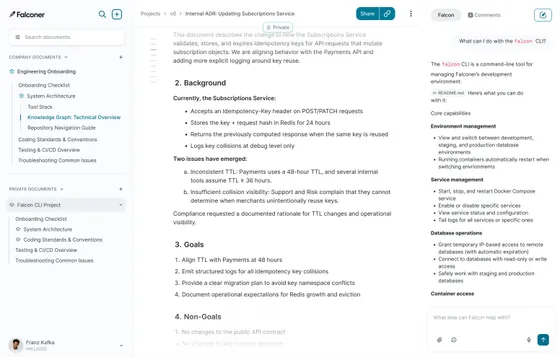
At Falconer, we take this further by connecting directly to your repositories and automatically flagging docs affected by code changes. Pull requests can trigger update suggestions, so the work moves from “track down what’s outdated” to “review and approve.” The writer’s role becomes editorial, not archaeological, which is where humans add the most value anyway.
How Falconer keeps engineering documentation current
Once Falconer detects which docs a merged pull request affects, you pick how to handle updates. Review mode surfaces proposed edits for your approval. Full self-driving mode applies changes automatically and notifies you in Slack, so you stay informed without manual gatekeeping.
The Falcon agent sits inside your editor, Slack, and IDE, answering technical questions directly from your codebase and connected sources. When someone asks “how does our auth service handle token refresh?” they get an answer grounded in actual code and docs.
We also pull context from Slack conversations, Linear tickets, Google Docs, and Notion into one searchable knowledge layer. Documentation becomes shared memory that stays current as your team and codebase grow.
Final thoughts on documentation maintenance
You already know your technical documentation is outdated somewhere. The question is whether you catch it during code review or six months later when someone makes a decision based on wrong information. Docs that update with your codebase stop being a separate concern and become part of shipping. Start by linking one doc type to your pull requests and see how much time you get back. The difference between stale docs and current ones is whether staying accurate is someone’s job or everyone’s afterthought.
FAQ
What’s the difference between product documentation and process documentation?
Product documentation describes how your system is built and how to interact with it (architecture docs, API references, data models), while process documentation covers what to do when things go wrong or when running operations (runbooks, deployment guides, incident reports). Teams that skip process documentation typically regret it after their first painful outage.
Can I keep documentation current without dedicating headcount to it?
Yes, by treating docs as part of your definition of done rather than a follow-up task. Add documentation updates to pull request templates, budget time in sprint planning for doc work, and assign clear ownership for each doc area so updates happen alongside code changes instead of piling up in a backlog.
Best tools for API documentation in 2026?
OpenAPI specification paired with generators like Swagger UI or Redoc gives you machine-readable, auto-generated references that stay consistent as endpoints change. This approach lets you validate and version docs alongside code, which directly addresses the “limited time” obstacle that 62% of teams cite as their biggest barrier to keeping API documentation current.
How do I know which documentation to write first?
Start with the docs your team asks about most frequently. If new hires spend their first week hunting for architecture context, write that. If support escalates the same configuration questions to engineering, document those flows. The best first doc is the one that eliminates the most repeated questions.
What should API documentation always include?
Authentication flows with token lifecycle details, endpoint descriptions showing HTTP methods and required headers, request and response examples with realistic payloads developers can copy, and error codes with handling guidance. Missing any of these forces developers to reverse-engineer your API through trial and error.
Ready to get started?
Create an account and start building your knowledge base — no contracts or credit card required. Or, contact us to design a custom package for your team.
Ready to get started?
Create an account and start building your knowledge base — no contracts or credit card required. Or, contact us to design a custom package for your team.