Documentation platforms for AI coding assistants in defense tech startups (May 2026)
Defense tech engineering teams ship at the velocity of a commercial startup inside environments with constraints a commercial startup doesn’t have. AI coding assistants like Cursor and Claude Code are now standard in those workflows, and the documentation those agents retrieve from has to keep up with both the pace of code change and the security requirements of the environment. The problem is that most documentation platforms were built for cloud SaaS or for slow-moving enterprise on-prem, and neither shape fits a defense tech engineering team that wants modern AI coding tooling without losing the data residency, access control, and accuracy properties the work requires. This guide covers what AI coding assistant ready means in practice, why defense tech is a distinct context, and which platforms can credibly serve it. For the general version of this comparison, see our guide to AI documentation tools.
Summary
- Defense tech teams ship fast, but documentation often can’t keep up with codebase velocity, and stale documentation produces wrong answers from AI coding agents
- A wrong answer from an AI coding agent is more expensive in defense tech than in a typical SaaS startup, which raises the stakes on documentation accuracy and retrieval quality
- AI coding assistant ready means passage-level retrieval, an MCP or programmatic interface (not a scrape of a published site), freshness detection tied to code changes, and codebase awareness
- Outline has the strongest self-hosting story among the wiki competitors and shipped an MCP server, which is a real step forward; the retrieval still returns documents rather than passages and isn’t tied to code
- Falconer ships a passage-first data model, a read/write MCP server, auto-updates triggered by merged pull requests, unified retrieval across code and docs and conversations, with SOC 2 Type II and a full on-premises deployment tier that runs air-gapped with no outbound internet required at runtime
The problem: codebase velocity outpaces documentation
Defense tech engineering teams have started looking a lot like commercial startups. They ship daily, run modern AI coding tooling, and expect their internal documentation to keep up. The documentation rarely does. Pages get written once and forgotten. Runbooks describe systems that were refactored three sprints ago. Architecture docs reference services that no longer exist. In a commercial SaaS context, that drift costs the team productivity. In defense tech, it costs more.
AI coding assistants amplify the cost. A coding agent answering from stale documentation produces confidently wrong code, sends developers down the wrong debugging path, and routes around the engineers who actually know the current state of the system. For teams where the cost of a wrong answer is higher than what a commercial startup will ever experience, the documentation layer feeding those agents has to stay accurate or the entire workflow becomes a liability.
The fix has to be structural. Manual maintenance doesn’t scale at shipping velocity, and the documentation platforms most defense tech teams have inherited weren’t built to update themselves when code changes.
Why defense tech is a distinct context
Three things separate defense tech from a typical SaaS engineering environment.
Security and data residency requirements. Many defense programs build their control requirements on federal catalogs like NIST SP 800-53, and documentation and the systems retrieving from it often need to stay inside a controlled boundary. That might be the team’s own cloud account, a self-hosted deployment in infrastructure the team operates, or a fully air-gapped environment with no outbound internet connectivity at all. Cloud-only platforms can’t meet the deeper end of this requirement. Platforms that advertise on-prem deployment but still phone home for licensing checks, telemetry, or container updates can’t either, even if the marketing page says otherwise. The bar for defense tech is no outbound connectivity required at runtime.

Clearance-level access controls. Documentation in defense tech is segmented by who’s allowed to see what, the same access-control discipline federal control catalogs like NIST SP 800-53 formalize, and the retrieval interface a coding agent uses has to respect those permissions at the API layer, not just in the UI. A platform that returns content based on what’s indexed rather than what the calling user is authorized for is creating an access control problem the moment an agent connects.
Higher cost of a wrong answer. Code that’s safety-critical, code deployed in places that can’t be patched easily, code in systems with operational consequences. The threshold for “good enough” agent context is higher than it is for a commercial application backend. That changes which documentation platforms are viable from a risk standpoint, not just from a features standpoint.
What “AI coding assistant ready” actually means
The phrase gets used loosely. The concrete properties that determine whether a coding agent can use a documentation platform productively are four.
Atomic chunking. Content stored as passages, not pages. A coding agent that asks “how does our authentication service handle token refresh” should get back the specific passage that answers the question, not a 4,000-word architecture document the agent has to chunk and rank itself. Platforms that return whole pages push the retrieval-quality problem onto the agent.
MCP or programmatic interface that’s part of the deployment. The Model Context Protocol is the open standard for connecting AI assistants to external data sources. For defense tech, the practical detail is that the MCP server should be part of the platform itself, not a scrape of a published site or a brittle third-party connector. A platform with an MCP server bundled into its deployment is something a coding agent can call directly; everything else is custom integration work.
Freshness detection tied to code changes. The platform should know when a merged pull request affects documentation, and it should flag or update the affected passages automatically. Manual freshness is the same problem at every scale, and at defense tech velocity it falls behind permanently within a few sprints.
Codebase awareness. Documentation should be linked to the repositories, pull requests, and symbols it describes. A wiki sitting next to the codebase with no connection to it is documentation in name only; the platform doesn’t know what changed, can’t reason about staleness, and can’t ground agent answers in the current state of the code. (For more on this distinction, see our guide to knowledge bases in developer workflows.)
Platform comparison
Confluence and SharePoint
Confluence and SharePoint are the enterprise wiki defaults in most large engineering organizations, including defense tech companies that adopted them early.
What they offer: Mature page management, established permissions models, on-prem deployment options (Confluence Data Center, SharePoint Server), wide adoption among engineers and non-engineers alike.
Who they fit: Larger defense tech orgs with established Atlassian or Microsoft deployments and dedicated platform teams to run them.
Where they fall short: Neither has an official MCP server.
Notion
Notion is the modern wiki incumbent, used at some defense tech teams as a Confluence alternative. Notion ships an official MCP server, which puts it ahead of Confluence and SharePoint on the protocol question.
What Notion offers: Flexible page and database structures, official MCP server with read and write tools (search, fetch, create, update, move pages and databases), wide cross-functional adoption, public API as a fallback.
Who Notion fits: Defense tech teams that use Notion as a general workspace and don’t have hard deployment constraints. Less common in environments that require self-hosted or bring-your-own-cloud operation.
Outline
Outline is a self-hostable wiki with the strongest self-hosting story in this comparison and an official MCP server that lets coding agents read from and write to Outline workspaces.
What Outline offers: Self-hosted deployment that the team operates inside its own infrastructure, clean modern editor, source-available codebase under the Business Source License (BSL 1.1) that some defense environments prefer for source review, official MCP server with read and write operations across documents, collections, and comments.
Who Outline fits: Defense tech teams that want a lightweight self-hosted wiki and have the operational capacity to run it themselves. Reasonable as a documentation surface for teams without complex retrieval needs.
Mintlify and GitBook
Mintlify and GitBook are hosted documentation platforms focused on API reference, product docs, and external developer documentation. They’re well-tuned for human readers and have clean published sites.
What they offer: Polished editors, hosted published sites, good defaults for technical documentation, GitHub-based publishing workflows, some AI-assisted search inside the products.
Who they fit: Defense tech teams publishing external developer documentation, partner-facing API reference, or product docs where the published site is the primary surface and the documentation doesn’t sit inside a controlled boundary.
Falconer
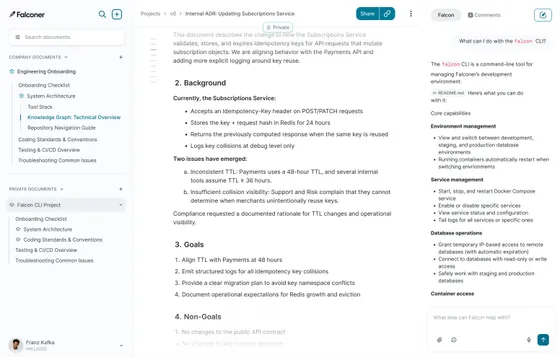
Falconer is a knowledge layer for engineering teams that connects GitHub, Slack, Linear, Notion, and Google Drive into one queryable source of truth. The product runs in cloud, VPC, and full on-premises configurations, including air-gapped environments with no outbound internet connectivity required at runtime. The same data model, MCP server, and retrieval quality run in every deployment mode.
Core strengths
- Passage-first data model: documentation is stored as passages tied to specific code, decisions, or tickets, so retrieval returns the unit that answers the question
- Falconer MCP, compatible with Claude Code, Cursor, and other MCP clients, so coding agents can search docs, update runbooks, and save postmortems directly from the IDE
- Auto-updates triggered by merged pull requests: when code changes, the affected passages get flagged or updated automatically, no manual maintenance
- Unified retrieval across code, docs, and conversations, so agents get the actual decision context from a Slack thread or a PR review, not just the summary in a wiki
- SOC 2 Type II, with cloud, VPC, and full on-premises deployment. The on-prem tier runs air-gapped with no outbound internet required at runtime; all container images are pre-baked into the VM image at build time, so the deployment doesn’t phone home after install
- Bring-your-own-key for AI providers, so model inference stays under your organization’s control
- Permission-aware retrieval: Falconer MCP enforces the same access controls as human access, so agents only return content the calling user is authorized to see
Who Falconer fits: Defense tech engineering teams running AI coding agents in environments with real deployment constraints and a low tolerance for stale or wrong answers from those agents.
The security angle
Defense tech engineering leaders evaluating documentation platforms typically have a stack of requirements that commercial teams don’t think about until much later.
SOC 2 Type II
SOC 2 Type II is the baseline for any vendor handling internal engineering data. Falconer is SOC 2 Type II certified.
Full on-premises and air-gapped deployment
This is the option that matters most in defense tech environments where outbound connectivity isn’t permitted. Falconer’s on-prem tier runs without any phone-home dependency: all container images are pre-baked into the VM image at build time, so the deployment doesn’t need to reach the internet for licensing, telemetry, or container updates after installation. The data, the documentation, the MCP server, and the retrieval interface all live inside the team’s environment, with no runtime calls outside it.
VPC and bring-your-own-cloud deployment
For teams that need controlled-environment deployment without going all the way to on-prem. The documentation, the retrieval interface, and the audit logs all live inside the team’s own cloud account, with the network controls the security team has already approved.
Bring-your-own-key for AI providers
Keeps model inference under organizational control. The team chooses which model providers are approved, holds the keys, and can revoke access without depending on the documentation vendor to make a configuration change.
Permission-aware retrieval
The property most documentation platforms haven’t built carefully. When an AI coding agent calls the MCP server, the server should resolve permissions based on the calling user’s identity and return only what that user is authorized to see. Anything less creates an access control gap the moment an agent connects.
The freshness problem is a mission risk in defense tech
Stale docs produce wrong code
In commercial SaaS, stale documentation costs the team productivity. In defense tech, it costs more. A coding agent retrieving from a runbook that hasn’t been updated since the last refactor doesn’t know it’s wrong, and the agent’s confident answer goes into code that may not get caught in review. The pattern repeats across architecture documents, deployment procedures, integration specifications, and the long tail of internal knowledge that informs day-to-day engineering decisions.
Manual maintenance can’t keep up
The only sustainable fix at shipping velocity is automatic detection. A documentation platform that knows when a merged pull request affects a passage, and either updates the passage or flags it for human review, closes the loop that manual maintenance can’t keep closed. Without that closed loop, the documentation drifts faster than the team can fix it, and the AI coding agents that depend on it produce increasingly stale context. The platforms in this comparison that don’t have freshness detection tied to code are accepting that drift as a permanent condition of using the product.

Why Falconer is the best documentation platform for defense tech AI workflows
The gap no other platform closes
The structural argument is that defense tech engineering teams need three things to overlap: a deployment model that fits their environment, a retrieval interface their AI coding agents can use, and a freshness story that holds up at the velocity they ship at.
The wiki incumbents (Confluence, SharePoint) have the deployment side and miss the other two. The cloud-native platforms (Notion, Mintlify, GitBook) have varying degrees of agent compatibility but can’t deploy into the environments defense tech teams actually operate in. Outline has the deployment story and the protocol layer, but the underlying retrieval is still document-shaped and not tied to code.
Why Falconer fits
Falconer was built to keep all three properties together in one product. The same passage-first data model and the same read/write MCP server run in cloud, VPC, and full on-premises configurations, including air-gapped environments with no outbound internet at runtime. Freshness detection tied to merged pull requests runs in all of them. Permission-aware retrieval works the same way regardless of deployment mode. Bring-your-own-key keeps model providers under the team’s control without changing how the rest of the product works.
For the broader case on why teams are consolidating engineering knowledge into a single on-prem-capable layer, see our piece on the enterprise LLM wiki.
For defense tech engineering teams currently using a wiki their coding agents can’t reach productively, or a cloud documentation platform their environment can’t host, see how Falconer’s deployment options map to your environment before adding another tool to the stack.
Feature comparison table
| Feature | Falconer | Outline | Notion | Confluence | SharePoint | Mintlify / GitBook |
|---|---|---|---|---|---|---|
| Full on-premises deployment | Yes | Yes | No | Yes | Yes | No |
| Air-gapped (no outbound internet at runtime) | Yes | Partial | No | Partial | Partial | No |
| SOC 2 Type II | Yes | Yes | Yes | Yes | Yes | Yes |
| Official MCP server | Yes | Yes | Yes | No | No | No |
| Read and write through MCP | Yes | Yes | Yes | N/A | N/A | N/A |
| Passage-level retrieval | Yes | No | No | No | No | No |
| Codebase awareness | Yes | No | No | No | No | Partial |
| Freshness detection tied to code | Yes | No | No | No | No | No |
| Auto-updates from merged PRs | Yes | No | No | No | No | No |
| Bring-your-own-key for AI providers | Yes | N/A | N/A | N/A | N/A | N/A |
| Permission-aware retrieval through MCP | Yes | Partial | Partial | N/A | N/A | N/A |
The pattern in the table is that the deployment column and the agent-readiness column rarely line up. Outline closes the gap further than any other wiki in this comparison, but the retrieval is still document-shaped. Falconer is the only platform where every row lines up.
Final thoughts
Defense tech engineering teams have been told for years that the best documentation tools live in the cloud and that on-prem options are a generation behind. That was true once. It isn’t anymore. The right documentation platform for a defense tech engineering team in 2026 is the one that runs inside the environment, supports the AI coding agents the engineers actually want to use, and meets the security constraints the program office will check. The set of platforms that meet all three constraints is small, and it’s the set that should be evaluated first.
FAQ
What makes a documentation platform suitable for defense tech AI workflows?
Four properties have to be true together. Passage-level retrieval, so coding agents get the specific answer rather than a long page to chunk themselves. An MCP server (or equivalent programmatic interface) that’s part of the platform’s deployment, so agents can reach the documentation without scraping a published site. Freshness detection tied to code changes, so the documentation stays accurate at shipping velocity. And permission-aware retrieval, so the agent only surfaces content the calling user is authorized to see. Platforms that meet three of four create gaps the team has to fill manually; platforms that meet all four are rare.
Can Cursor and Claude Code work with Confluence or SharePoint?
Indirectly. Both Cursor and Claude Code can call MCP servers or hit REST APIs, and Confluence and SharePoint expose APIs. The practical problem is that those APIs return pages rather than passages, with no codebase awareness or freshness signals, so the agent has to do all the chunking, ranking, and staleness assessment itself. The result is usable for shallow questions and unreliable for the kind of detailed engineering context defense tech teams actually need. Neither platform has shipped an official MCP server as of May 2026.
What deployment options exist for air-gapped or regulated environments?
The realistic options are platforms with credible on-prem and self-hosted stories. Outline runs self-hosted in the customer’s infrastructure. Confluence Data Center and SharePoint Server can be deployed on-prem with the right licensing, though both typically require additional tooling to operate without outbound connectivity. Falconer ships a full on-premises deployment tier that runs air-gapped with no outbound internet required at runtime, because all container images are pre-baked into the VM image at build time. Cloud-only platforms can’t meet this requirement regardless of their other compliance posture, because the underlying deployment depends on outbound connectivity. For defense tech teams that need both air-gapped deployment and agent compatibility, the set narrows considerably.
Does Outline’s MCP server make it AI coding assistant ready?
Outline’s MCP server is a real step forward and gives the platform a protocol layer that Confluence and SharePoint don’t have. But having an MCP server isn’t the same as having agent-ready retrieval. Outline’s MCP returns documents, not passages, which means a coding agent calling it still has to chunk and rank long pages on its own. There’s no freshness detection tied to code changes and no codebase awareness, so the documents the agent retrieves may not reflect the current state of the system. The protocol piece is now in place, and the underlying retrieval quality is the part that hasn’t shifted yet.
How does MCP differ from a standard REST API for documentation retrieval?
A REST API is a general-purpose interface for reading and writing data; how it’s used for AI assistant retrieval is up to whoever builds the integration. MCP, the open standard Anthropic introduced in late 2024, is a structured protocol specifically for connecting AI assistants to external data sources, with standard tool definitions, authentication patterns, and discovery mechanisms that any MCP-compatible client can use. The practical benefit is that integration work doesn’t have to be redone for every new AI tool. A documentation platform with an MCP server is reachable from Claude Code, Cursor, ChatGPT desktop, and any other compatible client without custom work. A documentation platform with only a REST API requires that work for every client, which is a drag on a defense tech team trying to standardize a tooling stack.
When should a defense tech team switch from Confluence to a retrieval-first platform?
When the team’s AI coding agents are giving wrong or stale answers from Confluence content, when developers are routing around the documentation because they don’t trust the retrieval, or when the maintenance burden of keeping pages current at shipping velocity has stopped being feasible. The switching cost is real, and migration off a deeply embedded Confluence deployment is a project, not a sprint. The cost compounds the longer the documentation layer drifts from the code, and at defense tech velocity that drift accelerates faster than it does in commercial environments.
Ready to get started?
Create an account and start building your knowledge base — no contracts or credit card required. Or, contact us to design a custom package for your team.
Ready to get started?
Create an account and start building your knowledge base — no contracts or credit card required. Or, contact us to design a custom package for your team.